
Utility Tools
Advanced selection and parameter manipulation tools.

Copy Concatenate Parameters
Creating composite strings from multiple Revit parameters — codes, labels, nomenclature — requires complex formulas or repetitive manual work.
Copy Concatenate Parameters visually builds concatenation formulas with parameters and free text, real-time preview, and automatic writing to the target parameter.




Power Selection
Revit's native selection capabilities are limited: rigid filters, no AND/OR logic, and no ability to combine different criteria.
Power Selection offers multiple filters combinable with AND/OR logic on workset, phases, categories, families, types, levels, and custom parameters, with cascading updates and configuration saving.




Find Link
Imported items like DWG files, images, and PDFs can pile up in a Revit model with no visibility into where they live. Hunting through views one by one is slow and error-prone.
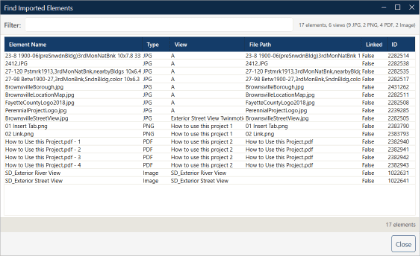
Find Link scans the whole project and shows a floating report of every imported element with its host view, type, and quick actions to select and manage them.

Workset Copy
Revit's native copy/paste does not preserve workset assignments, forcing manual reassignment after pasting — tedious and error-prone.
Workset Copy stores the workset assignments of the selected elements, ready for the matching Workset Paste to restore them automatically.


Workset Paste
After copying elements between models or views you have to restore the right worksets, wasting time on one-by-one reassignment.
Workset Paste pastes elements while automatically keeping the original workset assignments. Supports free placement, same point, and aligned-to-view or level placement.

Stay updated with exclusive tips
Receive weekly Revit tips, new features and best practices directly in your email.
No spam, only valuable content. Unsubscribe with one click.